How to Leave Your TikTok Agency
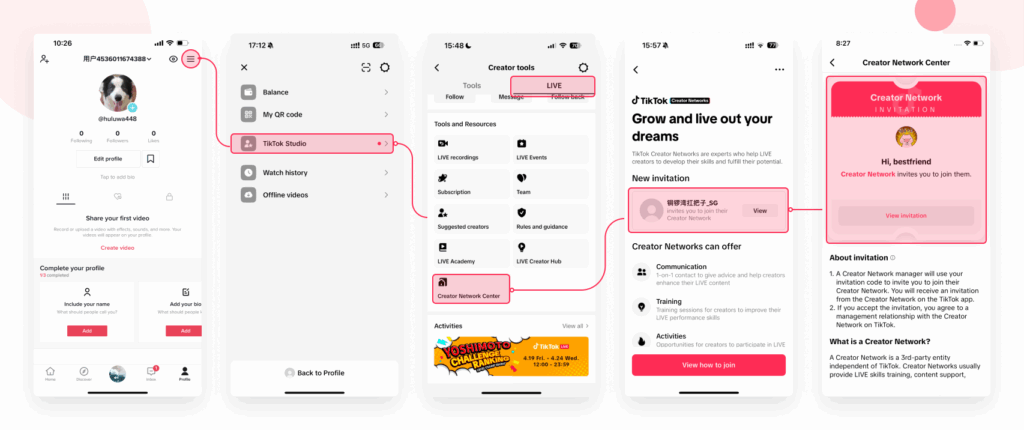
If you would like to leave your current TikTok agency, the most reliable method is to submit an exit request directly inside the TikTok app. The steps may vary slightly depending on whether you are signed to a TikTok LIVE Agency or a TikTok Shop Agency.
Method 1: Leaving a TikTok LIVE Agency
Follow these simple steps inside the TikTok app:
- Go to your Profile
- Tap the Menu ☰ button (top right)
- Select Settings and Privacy
- Tap Creator Tools
- Select LIVE Center
- Enter the Agency Center
Once inside the Agency Center:
- You will see the option to Leave Creator Network / Agency
- Submit your exit request
- When the agency approves your request, you will be unlinked immediately
Important Information
- Your current agency must approve your request before you are released.
- Once released, you are free to join another approved agency.
- If your request is delayed or ignored, you can contact TikTok Support through the app.
Need Help?
If you are leaving an agency and would like to join Network Q (UK-based, free TikTok Agency), we are happy to help guide you through the process.
Contact us:
📧 Email: tiktok.networkq@gmail.com
🌐 Website: https://networkq.agency